MSI B850 MPower Motherboard Review: Micro ATX made for overclocking memory
SOURCE:Tom's Hardware|BY: Joe Shields
MSI’s B850 MPower is a solid all-around motherboard, but excels at memory overclocking, specifically with 8000-series APUs, where speeds over 10,000 MT/s are possible.
The $229.99 MSI B850 MPower offers ample M.2 storage and fast networking. But to get the most out of this BN850 board, you should be overclocking, or look at other, less expensive options.
Pros
Supports up to DDR5-10200 (w/8000 series APU)
OC engine/BCLK generator
Four M.2 sockets (two PCIe 5.0)
Fast networking with Wi-Fi 7 and 5 GbE
Cons
-
Only seven USB Type-A ports on rear IO
-
Power delivery could be better
-
Pricey for Micro ATX B850
Why you can trust Tom's Hardware Our expert reviewers spend hours testing and comparing products and services so you can choose the best for you. Find out more about how we test.
Go to page:
Years ago, MSI released its first MPower motherboards. Starting with Z87, the boards had a black and yellow aesthetic and were designed for extreme overclocking (think Asus Apex, Gigabyte Tachyon, and ASRock OCF). Before the Z790 MPower (we did not see these in the States), the last iteration was in 2017 with Z170. Fast forward to today, and MSI has resurrected an AM5 model in the B850 MPower. The latest version comes in a Micro ATX form factor and, with its 2-DIMM configuration, is made to push the boundaries of memory overclocking (along with MPower Alliance-approved memory).
If you've seen these models before, you’ll know the current version screams MPower with its black-and-yellow appearance, but it doesn’t have any integrated RGB lighting. Keep in mind that it is an overclocking board where people generally don’t care for bling in the first place, and you can always add your own. On top of its listed memory prowess (over 10,000 MT/s with 8000 series APU), the B850 MPower offers four M.2 sockets (two PCIe 5.0), a quality audio solution, fast networking, and that signature MPower design for $229.99, available only via the US MSI Store.
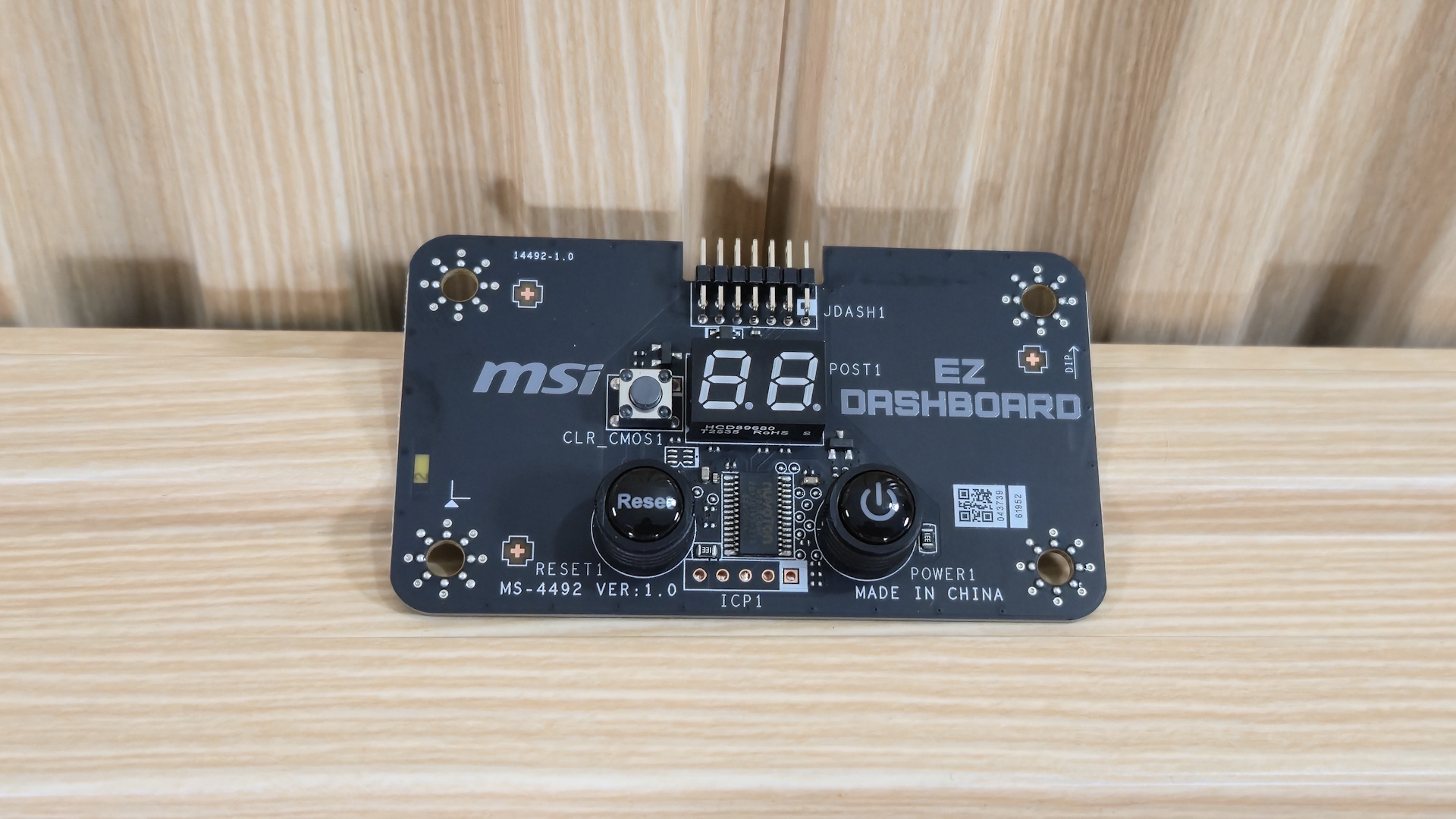
The B850 MPower includes a few accessories to get you started. You get your typical collection of cables, clips, and screws, but also the EZ Dashboard - a standalone PCB with power/reset buttons, a debug LED, and Clear CMOS buttons that’s useful for overclocking. We’ve listed everything MSI includes below and a picture of the EZ Dashboard as well.
EZ Dashboard
EZ Wi-Fi Antenna
Cable Stickers/Installation Guide
1 to 2 EZ Conn-cable (v1)
SATA cable
EZ Front Panel Cable
EZ M.2 Clip II remover
(3) EZ M.2 Clip II
M.2 screw
(Image credit: Future)
Design of the MPower
Image
1
of
6
(Image credit: Future)
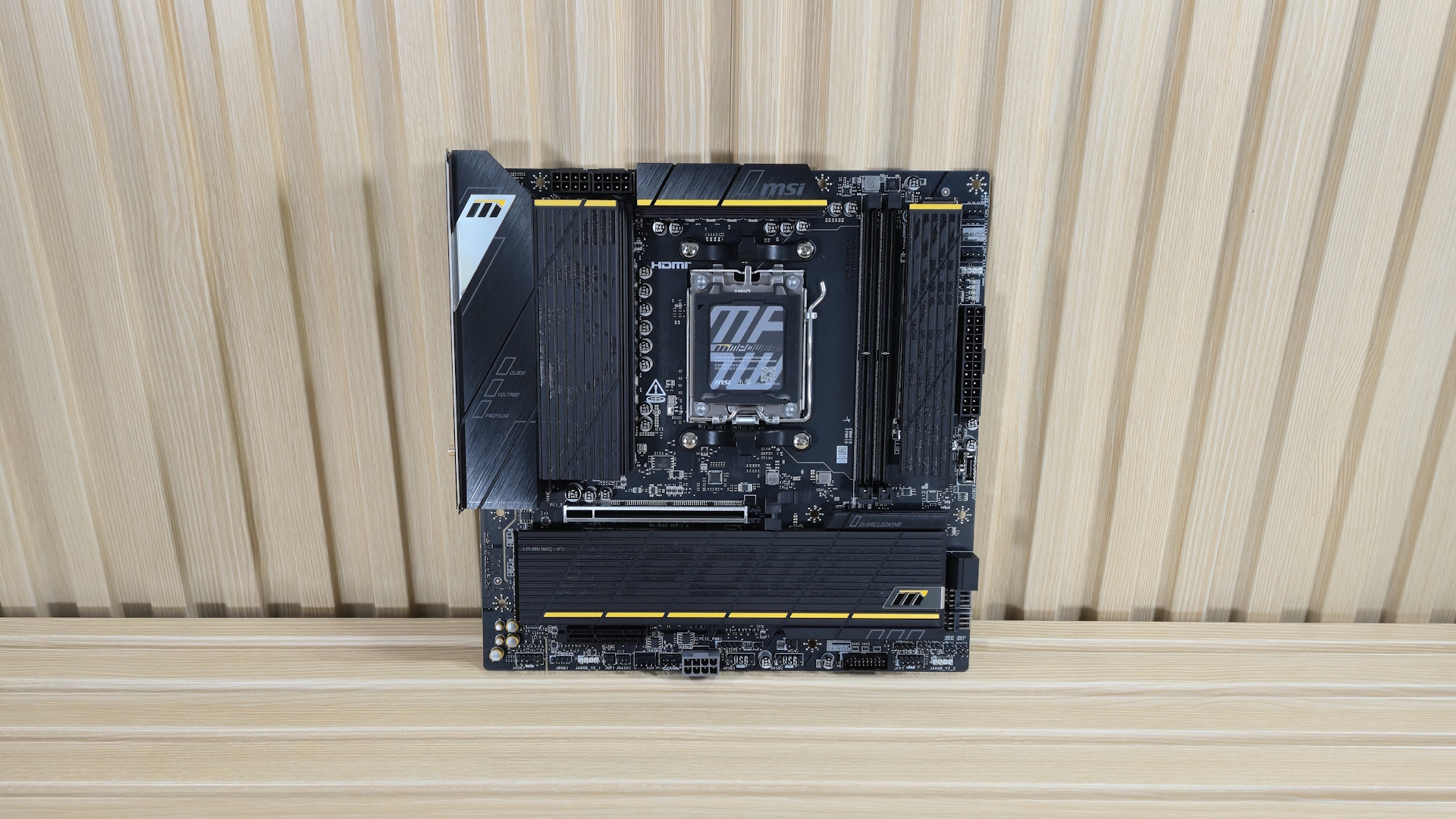
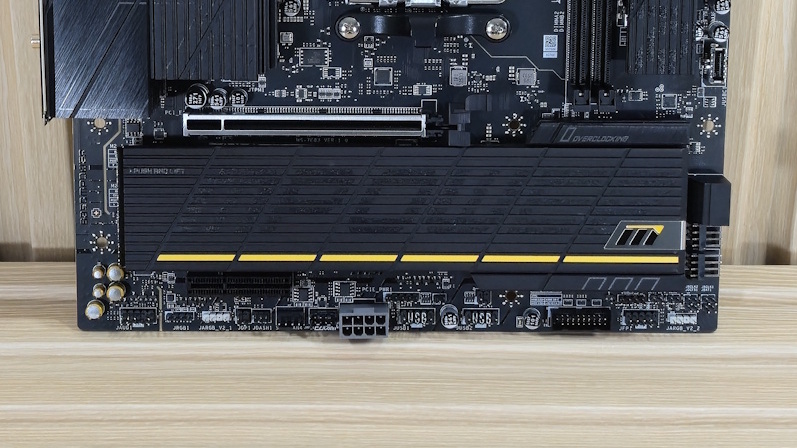
Today’s MPower gives serious retro vibes, maintaining the same all-black / yellow-highlight theme you may be familiar with from back in the day. The oversize VRM heatsink features a ribbed appearance and a brushed-aluminum finish with the MSI dragon logo on top. The M.2 and chipset heatsink is plate-style and has additional MPower branding written across another ribbed and lined surface. To the right of the DIMM slots is another M.2 socket with the same style cues. All plate heatsinks use the EZ M.2 Shield Froz II button to remove the covers with one finger.
Overall, we like the look of the Mpower, regardless of its simple aesthetic. It’s basic black and yellow highlights will blend in with any build, but it’s just not a showpiece like other, more expensive boards can be. Since it’s more purpose-built for overclocking and it's still really a budget option, we won’t hold its design against it.
(Image credit: Future)
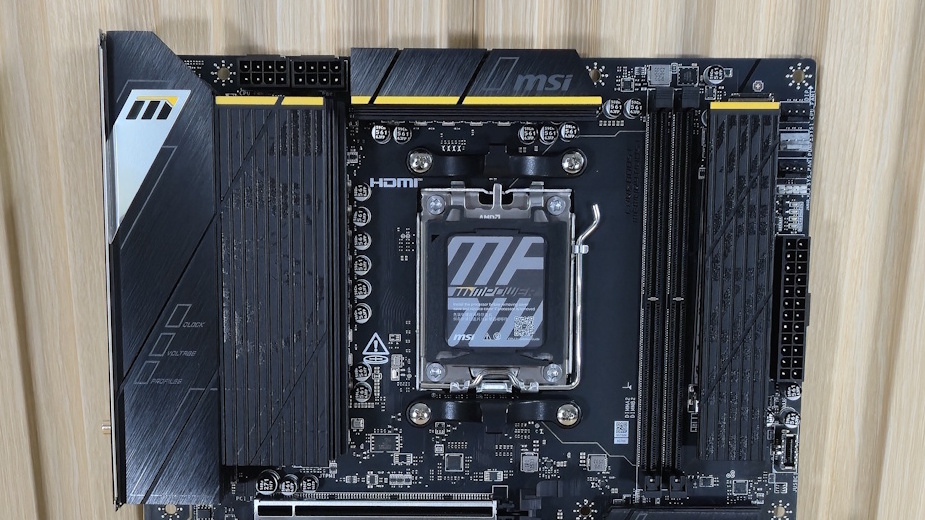
In the upper-left corner, we get a better look at the large VRM heatsink and its design details. Above that are the two 8-pin EPS connectors (one required) to power the processor, and just off to their right is the second, smaller VRM heatsink.
Moving right, past the socket, we run into the two DRAM slots, each sporting a locking mechanism at the top, where there’s more room to access them. MSI lists support for a mind-bending DDR5-10200, but only with 8000 series APUs. Desktop processors like the 9000 series support up to DDR5-8400, which is still fast and well past AMD’s ‘sweetspot’ for RAM (around DDR5-6000 to 6400). As the story goes, our Klevv kit booted to Windows but couldn't complete a stress test with our current processor. So far, only two motherboards ran these sticks, but I’m surprised this wasn’t one of them.
Get Tom's Hardware's best news and in-depth reviews, straight to your inbox.
Next to the DRAM slots is M2_2, the second of four M.2 sockets. This one runs up to PCIe 5.0 x4 (128 Gbps) and supports up to 80mm devices. We’ll cover the other three a bit later. Moving down the right edge, we run into the first three (of six) 4-pin fan headers. Each header supports DC- and PWM-controlled devices, with varying power outputs. The CPU _FAN1 header starts in auto mode and outputs up to 2A/24W. The PUMP_SYS1 header starts in PWM mode and delivers the highest output at 3A/36W. Lastly, the system fan headers also start in Auto mode and output the least at 1A/12W. There are plenty of headers and lots of power to go around. Below that are the first 3-pin ARGB header, the Debug LEDs, a 24-pin ATX power connector, and finally a front-panel USB 3.2 Gen 2 (10 Gbps) Type-C connector.
(Image credit: Future)
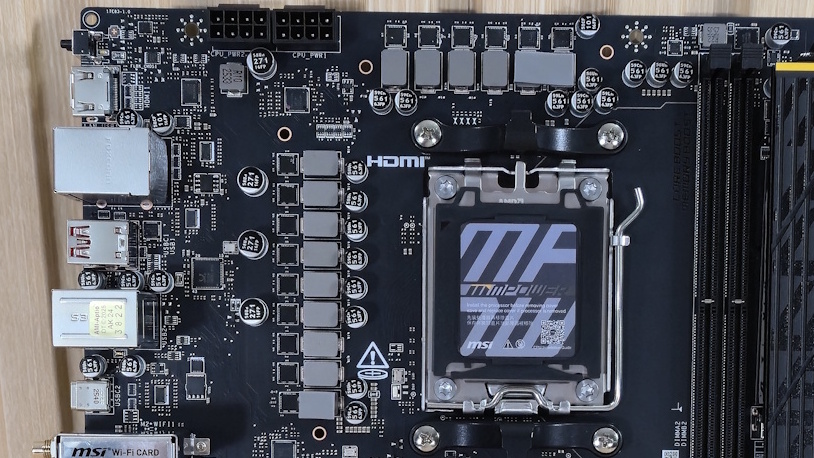
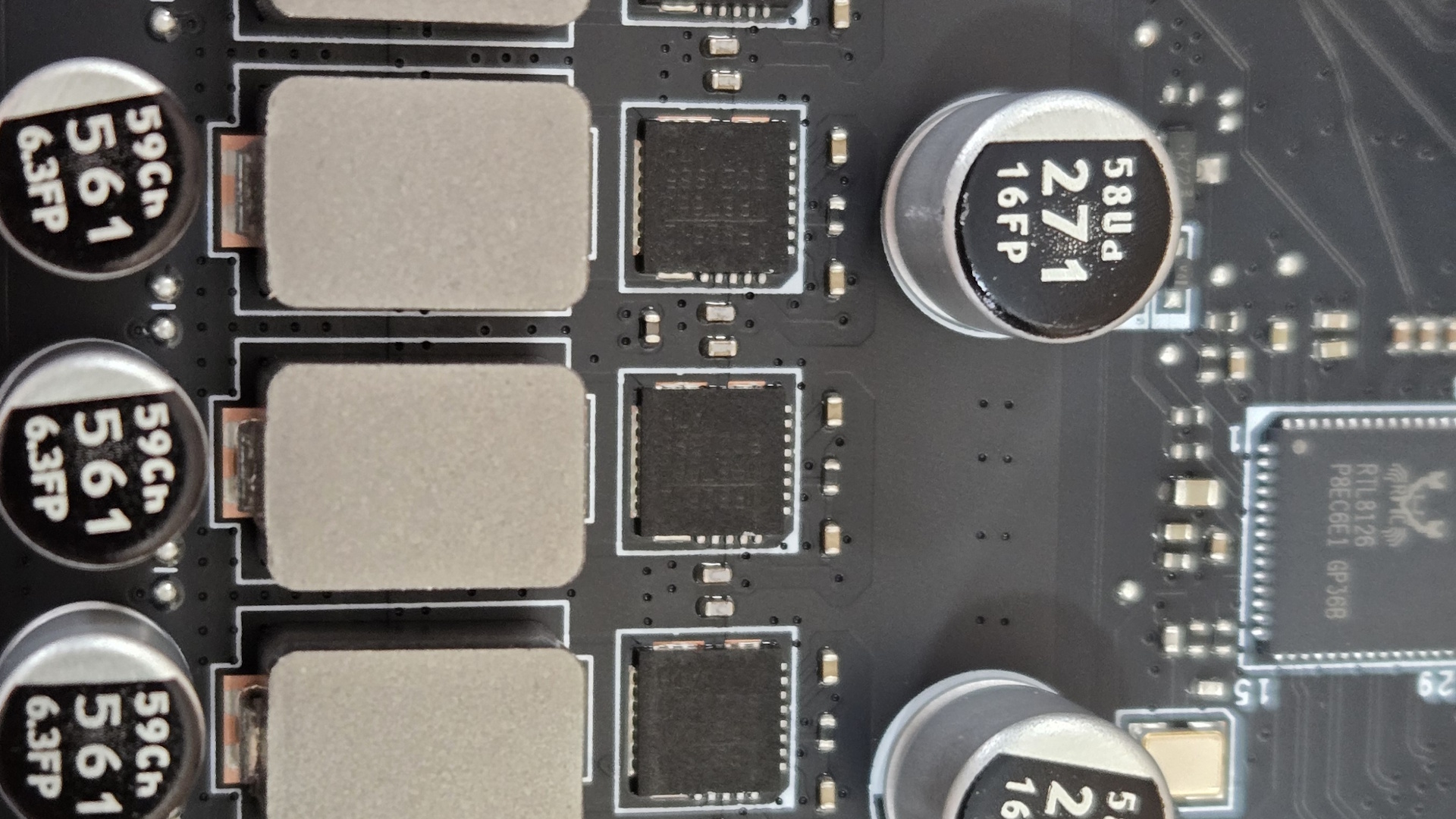
Power delivery on the B850 MPower consists of 15 phases, 12 of which are responsible for Vcore. Power is supplied to the Duet Rail configuration via the 8-pin EPS connector(s) to a Monolithic Power Systems (MPS) MP22501 controller. Power then heads to the MPS2512 60A MOSFETs. The 720A available isn’t a lot at all, especially for an ‘overclocking’ motherboard. That said, it should still be fine to overclock flagship-class processors like the Ryzen 9 9950X, or even pushing gaming processors like the Ryzen 7 9800X3D. You should be fine here, but I would have liked to see higher-output MOSFETs on a board designed for overclocking.
(Image credit: Future)
On the bottom half of the board, starting on the left side, is the audio section. Here, MSI uses the Realtek ALC4080 codec, a few dedicated audio capacitors, and the audio separation line - typical fare. It’s a middling audio codec and fine for an overclocking-focused board.
In the middle of our Micro ATX board are two PCIe slots and two M.2 sockets, with the third up by the DRAM slots and the fourth on the back of the board. The primary full-length PCIe slot connects through the CPU and runs at PCIe 5.0 x16 speeds. The bottom x4 slot connects to the chipset and runs at PCIe 4.0 x4 speeds. Seeing as there are only two PCIe slots, I’d like to see the second slot be open-ended or full-length to better support expansion needs.
Under the EZ M.2 Shield Frozr plate heatsink are two M.2 sockets (M2_1 and M2_3). M2_1 is the second PCIe 5.0 x4 (128 Gbps) socket, connected to the CPU. The bottom and the rear M.2 sockets (M2_3/4) connect through the chipset with M2_3 running the full PCIe 4.0 x4 (64 Gbps), while M2_4 on the back of the motherboard runs up to PCIe 4.0 x2 (32 Gbps). It’s nice to see four M.2 sockets on a smaller board. But I worry about the heatsinks with hot-running PCIe 5.0 drives and extended file transfers under the plate heatinks. At the very least, you’ll want a good amount of cool air passing over those heatsinks. Last, along the right edge, are two SATA ports and two 4-pin fan headers.
We've also included many images of the active IC's for the board. MSI and B850 MPower used a wide range of brands including Monolithic Power systems (VRMs), Realtek (audio, USB, PWM controller), and Genysys Logic (USB) chips.
Image
1
of
7
(Image credit: Future)
At the bottom are several headers, ranging from the front panel to the fans. From left to right, we’ve listed them below. One item worth mentioning is the supplemental PCIe power connector for additional board power, so the board can actually output everything it’s rated for.
Front panel audio
4-pin RGB
3-pin ARGB
4-pin System fan
JAF (fan/argb combo header)
PCIe supplemental power
(2) USB 2.0 headers
19-pin front panel USB 3.2 Gen1
Front panel
LN2, BCLK, battery
(Image credit: Future)
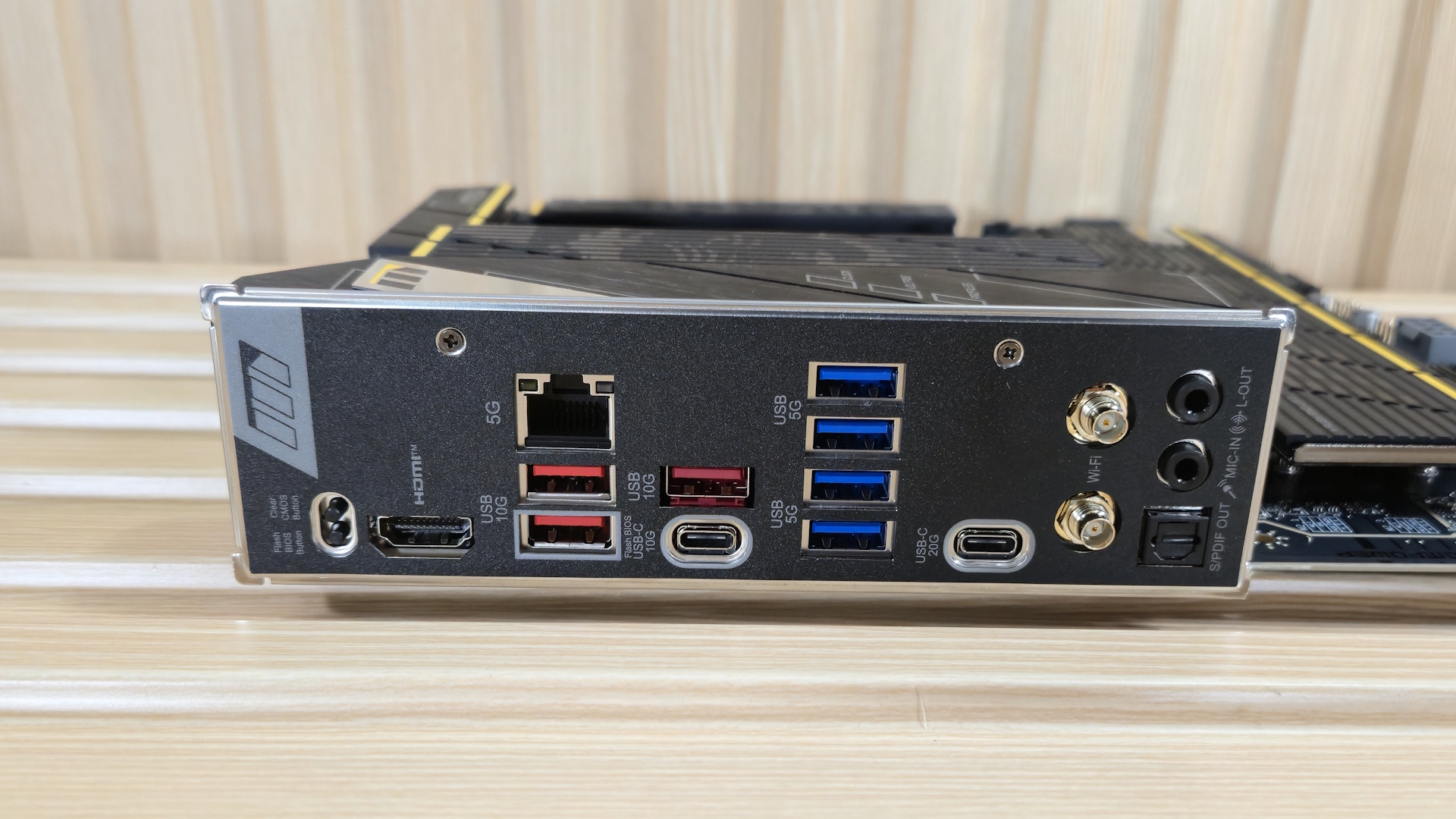
The rear IO on the B850 MPower has what you need, but it’s surprisingly sparse, even for B850. Starting on the left, there are two small buttons: BIOS Flash and Clear CMOS. Next to that is an HDMI (v2.1) video output for integrated graphics, and the Realtek 5 GbE port. Next, there are 9 USB ports. You get two Type-C ports (20 Gbps and 10 Gbps), three USB 3.2 Gen 2 (10 Gbps, red) ports, and four USB 3.2 Gen 1 (5 Gbps, blue). Next to that is the Wi-Fi 7 connection and the audio stack (two 3.5mm jacks and SPDIF out).